> ## Documentation Index
> Fetch the complete documentation index at: https://langchain-5e9cc07a-preview-srimpr-1771619406-31dcf4f.mintlify.site/llms.txt
> Use this file to discover all available pages before exploring further.
# Subgraphs
This guide explains the mechanics of using subgraphs. A subgraph is a [graph](/oss/python/langgraph/graph-api#graphs) that is used as a [node](/oss/python/langgraph/graph-api#nodes) in another graph.
Subgraphs are useful for:
* Building [multi-agent systems](/oss/python/langchain/multi-agent)
* Re-using a set of nodes in multiple graphs
* Distributing development: when you want different teams to work on different parts of the graph independently, you can define each part as a subgraph, and as long as the subgraph interface (the input and output schemas) is respected, the parent graph can be built without knowing any details of the subgraph
## Setup
```bash pip theme={null}
pip install -U langgraph
```
```bash uv theme={null}
uv add langgraph
```
**Set up LangSmith for LangGraph development**
Sign up for [LangSmith](https://smith.langchain.com) to quickly spot issues and improve the performance of your LangGraph projects. LangSmith lets you use trace data to debug, test, and monitor your LLM apps built with LangGraph — read more about how to get started [here](https://docs.smith.langchain.com).
## Define subgraph communication
When adding subgraphs, you need to define how the parent graph and the subgraph communicate:
| Pattern | When to use | State schemas |
| --------------------------------------------------------------- | ------------------------------------------------------------------------------------------------------------------ | -------------------------------------------------------------------------------------------------------------- |
| [Call a subgraph inside a node](#call-a-subgraph-inside-a-node) | Parent and subgraph have **different state schemas** (no shared keys), or you need to transform state between them | You write a wrapper function that maps parent state to subgraph input and subgraph output back to parent state |
| [Add a subgraph as a node](#add-a-subgraph-as-a-node) | Parent and subgraph **share state keys** — the subgraph reads from and writes to the same channels as the parent | You pass the compiled subgraph directly to `add_node` — no wrapper function needed |
### Call a subgraph inside a node
When the parent graph and subgraph have **different state schemas** (no shared keys), invoke the subgraph inside a node function. This is common when you want to keep a private message history for each agent in a [multi-agent](/oss/python/langchain/multi-agent) system.
The node function transforms the parent state to the subgraph state before invoking the subgraph, and transforms the results back to the parent state before returning.
```python theme={null}
from typing_extensions import TypedDict
from langgraph.graph.state import StateGraph, START
class SubgraphState(TypedDict):
bar: str
# Subgraph
def subgraph_node_1(state: SubgraphState):
return {"bar": "hi! " + state["bar"]}
subgraph_builder = StateGraph(SubgraphState)
subgraph_builder.add_node(subgraph_node_1)
subgraph_builder.add_edge(START, "subgraph_node_1")
subgraph = subgraph_builder.compile()
# Parent graph
class State(TypedDict):
foo: str
def call_subgraph(state: State):
# Transform the state to the subgraph state
subgraph_output = subgraph.invoke({"bar": state["foo"]}) # [!code highlight]
# Transform response back to the parent state
return {"foo": subgraph_output["bar"]}
builder = StateGraph(State)
builder.add_node("node_1", call_subgraph)
builder.add_edge(START, "node_1")
graph = builder.compile()
```
```python theme={null}
from typing_extensions import TypedDict
from langgraph.graph.state import StateGraph, START
# Define subgraph
class SubgraphState(TypedDict):
# note that none of these keys are shared with the parent graph state
bar: str
baz: str
def subgraph_node_1(state: SubgraphState):
return {"baz": "baz"}
def subgraph_node_2(state: SubgraphState):
return {"bar": state["bar"] + state["baz"]}
subgraph_builder = StateGraph(SubgraphState)
subgraph_builder.add_node(subgraph_node_1)
subgraph_builder.add_node(subgraph_node_2)
subgraph_builder.add_edge(START, "subgraph_node_1")
subgraph_builder.add_edge("subgraph_node_1", "subgraph_node_2")
subgraph = subgraph_builder.compile()
# Define parent graph
class ParentState(TypedDict):
foo: str
def node_1(state: ParentState):
return {"foo": "hi! " + state["foo"]}
def node_2(state: ParentState):
# Transform the state to the subgraph state
response = subgraph.invoke({"bar": state["foo"]})
# Transform response back to the parent state
return {"foo": response["bar"]}
builder = StateGraph(ParentState)
builder.add_node("node_1", node_1)
builder.add_node("node_2", node_2)
builder.add_edge(START, "node_1")
builder.add_edge("node_1", "node_2")
graph = builder.compile()
for chunk in graph.stream({"foo": "foo"}, subgraphs=True):
print(chunk)
```
```
((), {'node_1': {'foo': 'hi! foo'}})
(('node_2:577b710b-64ae-31fb-9455-6a4d4cc2b0b9',), {'subgraph_node_1': {'baz': 'baz'}})
(('node_2:577b710b-64ae-31fb-9455-6a4d4cc2b0b9',), {'subgraph_node_2': {'bar': 'hi! foobaz'}})
((), {'node_2': {'foo': 'hi! foobaz'}})
```
This is an example with two levels of subgraphs: parent -> child -> grandchild.
```python theme={null}
# Grandchild graph
from typing_extensions import TypedDict
from langgraph.graph.state import StateGraph, START, END
class GrandChildState(TypedDict):
my_grandchild_key: str
def grandchild_1(state: GrandChildState) -> GrandChildState:
# NOTE: child or parent keys will not be accessible here
return {"my_grandchild_key": state["my_grandchild_key"] + ", how are you"}
grandchild = StateGraph(GrandChildState)
grandchild.add_node("grandchild_1", grandchild_1)
grandchild.add_edge(START, "grandchild_1")
grandchild.add_edge("grandchild_1", END)
grandchild_graph = grandchild.compile()
# Child graph
class ChildState(TypedDict):
my_child_key: str
def call_grandchild_graph(state: ChildState) -> ChildState:
# NOTE: parent or grandchild keys won't be accessible here
grandchild_graph_input = {"my_grandchild_key": state["my_child_key"]}
grandchild_graph_output = grandchild_graph.invoke(grandchild_graph_input)
return {"my_child_key": grandchild_graph_output["my_grandchild_key"] + " today?"}
child = StateGraph(ChildState)
# We're passing a function here instead of just compiled graph (`grandchild_graph`)
child.add_node("child_1", call_grandchild_graph)
child.add_edge(START, "child_1")
child.add_edge("child_1", END)
child_graph = child.compile()
# Parent graph
class ParentState(TypedDict):
my_key: str
def parent_1(state: ParentState) -> ParentState:
# NOTE: child or grandchild keys won't be accessible here
return {"my_key": "hi " + state["my_key"]}
def parent_2(state: ParentState) -> ParentState:
return {"my_key": state["my_key"] + " bye!"}
def call_child_graph(state: ParentState) -> ParentState:
child_graph_input = {"my_child_key": state["my_key"]}
child_graph_output = child_graph.invoke(child_graph_input)
return {"my_key": child_graph_output["my_child_key"]}
parent = StateGraph(ParentState)
parent.add_node("parent_1", parent_1)
# We're passing a function here instead of just a compiled graph (`child_graph`)
parent.add_node("child", call_child_graph)
parent.add_node("parent_2", parent_2)
parent.add_edge(START, "parent_1")
parent.add_edge("parent_1", "child")
parent.add_edge("child", "parent_2")
parent.add_edge("parent_2", END)
parent_graph = parent.compile()
for chunk in parent_graph.stream({"my_key": "Bob"}, subgraphs=True):
print(chunk)
```
```
((), {'parent_1': {'my_key': 'hi Bob'}})
(('child:2e26e9ce-602f-862c-aa66-1ea5a4655e3b', 'child_1:781bb3b1-3971-84ce-810b-acf819a03f9c'), {'grandchild_1': {'my_grandchild_key': 'hi Bob, how are you'}})
(('child:2e26e9ce-602f-862c-aa66-1ea5a4655e3b',), {'child_1': {'my_child_key': 'hi Bob, how are you today?'}})
((), {'child': {'my_key': 'hi Bob, how are you today?'}})
((), {'parent_2': {'my_key': 'hi Bob, how are you today? bye!'}})
```
### Add a subgraph as a node
When the parent graph and subgraph **share state keys**, you can pass a compiled subgraph directly to `add_node`. No wrapper function is needed — the subgraph reads from and writes to the parent's state channels automatically. For example, in [multi-agent](/oss/python/langchain/multi-agent) systems, the agents often communicate over a shared [messages](/oss/python/langgraph/graph-api#why-use-messages) key.
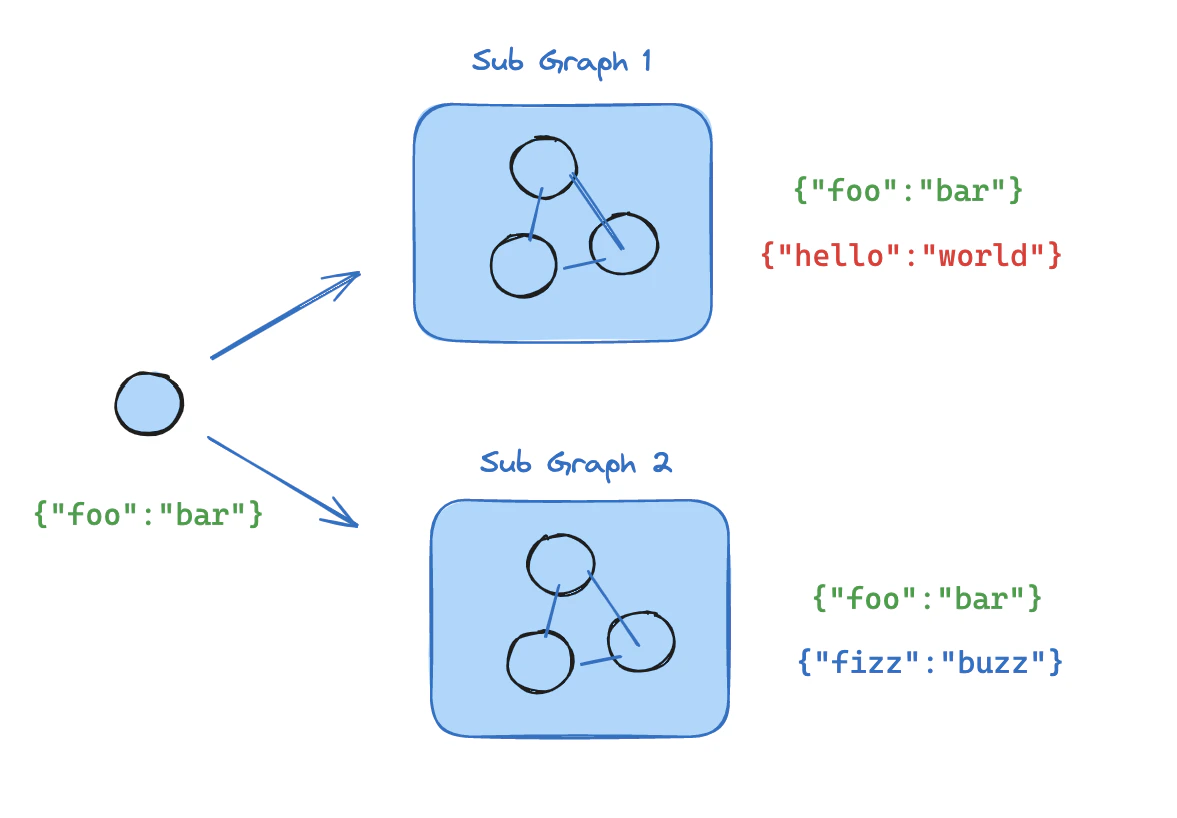 If your subgraph shares state keys with the parent graph, you can follow these steps to add it to your graph:
1. Define the subgraph workflow (`subgraph_builder` in the example below) and compile it
2. Pass compiled subgraph to the [`add_node`](https://reference.langchain.com/python/langgraph/graphs/#langgraph.graph.state.StateGraph.add_node) method when defining the parent graph workflow
```python theme={null}
from typing_extensions import TypedDict
from langgraph.graph.state import StateGraph, START
class State(TypedDict):
foo: str
# Subgraph
def subgraph_node_1(state: State):
return {"foo": "hi! " + state["foo"]}
subgraph_builder = StateGraph(State)
subgraph_builder.add_node(subgraph_node_1)
subgraph_builder.add_edge(START, "subgraph_node_1")
subgraph = subgraph_builder.compile()
# Parent graph
builder = StateGraph(State)
builder.add_node("node_1", subgraph) # [!code highlight]
builder.add_edge(START, "node_1")
graph = builder.compile()
```
```python theme={null}
from typing_extensions import TypedDict
from langgraph.graph.state import StateGraph, START
# Define subgraph
class SubgraphState(TypedDict):
foo: str # shared with parent graph state
bar: str # private to SubgraphState
def subgraph_node_1(state: SubgraphState):
return {"bar": "bar"}
def subgraph_node_2(state: SubgraphState):
# note that this node is using a state key ('bar') that is only available in the subgraph
# and is sending update on the shared state key ('foo')
return {"foo": state["foo"] + state["bar"]}
subgraph_builder = StateGraph(SubgraphState)
subgraph_builder.add_node(subgraph_node_1)
subgraph_builder.add_node(subgraph_node_2)
subgraph_builder.add_edge(START, "subgraph_node_1")
subgraph_builder.add_edge("subgraph_node_1", "subgraph_node_2")
subgraph = subgraph_builder.compile()
# Define parent graph
class ParentState(TypedDict):
foo: str
def node_1(state: ParentState):
return {"foo": "hi! " + state["foo"]}
builder = StateGraph(ParentState)
builder.add_node("node_1", node_1)
builder.add_node("node_2", subgraph)
builder.add_edge(START, "node_1")
builder.add_edge("node_1", "node_2")
graph = builder.compile()
for chunk in graph.stream({"foo": "foo"}):
print(chunk)
```
```
{'node_1': {'foo': 'hi! foo'}}
{'node_2': {'foo': 'hi! foobar'}}
```
## Subgraph persistence
By default, subgraphs start fresh on every invocation — they have no memory of previous calls. This is the right choice for most applications, including [multi-agent](/oss/python/langchain/multi-agent) systems where subagents are invoked as tools.
If a subagent needs to remember previous conversations (multi-turn history), you can enable stateful persistence so state accumulates across invocations on the same thread.
The parent graph must be compiled with a checkpointer for subgraph persistence features (interrupts, state inspection, stateful memory) to work. See [persistence](/oss/python/langgraph/persistence).
### Stateless
Both `checkpointer=False` and `checkpointer=None` produce stateless behavior — each invocation starts fresh with no memory of previous calls. The difference is whether the subgraph supports [interrupts](/oss/python/langgraph/interrupts) within a single invocation.
#### Without interrupts
Compile with `checkpointer=False` to opt out of checkpointing entirely. No checkpoints are written for the subgraph. The subgraph cannot use `interrupt()` and its state is not inspectable via `get_state`. This is the lightest-weight option.
```python theme={null}
subgraph_builder = StateGraph(...)
subgraph = subgraph_builder.compile(checkpointer=False) # [!code highlight]
```
#### With interrupts
This is the recommended mode for most applications, including [multi-agent](/oss/python/langchain/multi-agent) systems where subagents are invoked as tools. It supports interrupts and parallel calls while keeping each invocation isolated.
The default behavior when you omit `checkpointer` or set it to `None`. The subgraph inherits the parent's checkpointer and each invocation gets a unique checkpoint namespace. Within a single invocation, the subgraph can use `interrupt()` to pause and resume.
The following examples use two subagents (fruit expert, veggie expert) wrapped as tools for an outer agent:
```python theme={null}
from langchain.agents import create_agent
from langchain_core.tools import tool
from langgraph.checkpoint.memory import MemorySaver
from langgraph.types import Command, interrupt
@tool
def fruit_info(fruit_name: str) -> str:
"""Look up fruit info."""
return f"Info about {fruit_name}"
@tool
def veggie_info(veggie_name: str) -> str:
"""Look up veggie info."""
return f"Info about {veggie_name}"
# Subagents — no checkpointer setting (inherits parent)
fruit_agent = create_agent(
model="gpt-4.1-mini",
tools=[fruit_info],
prompt="You are a fruit expert. Use the fruit_info tool. Respond in one sentence.",
)
veggie_agent = create_agent(
model="gpt-4.1-mini",
tools=[veggie_info],
prompt="You are a veggie expert. Use the veggie_info tool. Respond in one sentence.",
)
# Wrap subagents as tools for the outer agent
@tool
def ask_fruit_expert(question: str) -> str:
"""Ask the fruit expert. Use for ALL fruit questions."""
response = fruit_agent.invoke(
{"messages": [{"role": "user", "content": question}]},
)
return response["messages"][-1].content
@tool
def ask_veggie_expert(question: str) -> str:
"""Ask the veggie expert. Use for ALL veggie questions."""
response = veggie_agent.invoke(
{"messages": [{"role": "user", "content": question}]},
)
return response["messages"][-1].content
# Outer agent with checkpointer
agent = create_agent(
model="gpt-4.1-mini",
tools=[ask_fruit_expert, ask_veggie_expert],
prompt=(
"You have two experts: ask_fruit_expert and ask_veggie_expert. "
"ALWAYS delegate questions to the appropriate expert."
),
checkpointer=MemorySaver(),
)
```
Each invocation can use `interrupt()` to pause and resume. Add `interrupt()` to a tool function to require user approval before proceeding:
```python theme={null}
@tool
def fruit_info(fruit_name: str) -> str:
"""Look up fruit info."""
interrupt("continue?") # [!code highlight]
return f"Info about {fruit_name}"
```
```python theme={null}
config = {"configurable": {"thread_id": "1"}}
# Invoke — the subagent's tool calls interrupt()
response = agent.invoke(
{"messages": [{"role": "user", "content": "Tell me about apples"}]},
config=config,
)
# response contains __interrupt__
# Resume — approve the interrupt
response = agent.invoke(Command(resume=True), config=config) # [!code highlight]
# Subagent message count: 4
```
Each invocation starts with a fresh subagent state. The subagent does not remember previous calls:
```python theme={null}
config = {"configurable": {"thread_id": "1"}}
# First call
response = agent.invoke(
{"messages": [{"role": "user", "content": "Tell me about apples"}]},
config=config,
)
# Subagent message count: 4
# Second call — subagent starts fresh, no memory of apples
response = agent.invoke(
{"messages": [{"role": "user", "content": "Now tell me about bananas"}]},
config=config,
)
# Subagent message count: 4 (still fresh!)
```
Multiple calls to the same subgraph work without conflicts, since each invocation gets its own checkpoint namespace:
```python theme={null}
config = {"configurable": {"thread_id": "1"}}
# LLM calls ask_fruit_expert for both apples and bananas
response = agent.invoke(
{"messages": [{"role": "user", "content": "Tell me about apples and bananas"}]},
config=config,
)
# Subagent message count: 4 (apples — fresh)
# Subagent message count: 4 (bananas — fresh)
```
### Stateful
Compile with `checkpointer=True` to enable state that accumulates across invocations on the same thread. LangGraph strips task IDs from the checkpoint namespace (turning `node:task_id|subnode:subtask_id` into `node|subnode`), so the subgraph writes to the same namespace every time. The subgraph "remembers" previous calls — use this when a subagent needs multi-turn conversation history.
The following examples use a single fruit expert subagent compiled with `checkpointer=True`:
```python theme={null}
from langchain.agents import create_agent
from langchain_core.tools import tool
from langgraph.checkpoint.memory import MemorySaver
from langgraph.types import Command, interrupt
@tool
def fruit_info(fruit_name: str) -> str:
"""Look up fruit info."""
return f"Info about {fruit_name}"
# Subagent with checkpointer=True for persistent state
fruit_agent = create_agent(
model="gpt-4.1-mini",
tools=[fruit_info],
prompt="You are a fruit expert. Use the fruit_info tool. Respond in one sentence.",
checkpointer=True, # [!code highlight]
)
# Wrap subagent as a tool for the outer agent
@tool
def ask_fruit_expert(question: str) -> str:
"""Ask the fruit expert. Use for ALL fruit questions."""
response = fruit_agent.invoke(
{"messages": [{"role": "user", "content": question}]},
)
return response["messages"][-1].content
# Outer agent with checkpointer
agent = create_agent(
model="gpt-4.1-mini",
tools=[ask_fruit_expert],
prompt="You have a fruit expert. ALWAYS delegate fruit questions to ask_fruit_expert.",
checkpointer=MemorySaver(),
)
```
Stateful subagents support `interrupt()` just like per-invocation. Add `interrupt()` to a tool function to require user approval:
```python theme={null}
@tool
def fruit_info(fruit_name: str) -> str:
"""Look up fruit info."""
interrupt("continue?") # [!code highlight]
return f"Info about {fruit_name}"
```
```python theme={null}
config = {"configurable": {"thread_id": "1"}}
# Invoke — the subagent's tool calls interrupt()
response = agent.invoke(
{"messages": [{"role": "user", "content": "Tell me about apples"}]},
config=config,
)
# response contains __interrupt__
# Resume — approve the interrupt
response = agent.invoke(Command(resume=True), config=config) # [!code highlight]
# Subagent message count: 4
```
State accumulates across invocations — the subagent remembers past conversations:
```python theme={null}
config = {"configurable": {"thread_id": "1"}}
# First call
response = agent.invoke(
{"messages": [{"role": "user", "content": "Tell me about apples"}]},
config=config,
)
# Subagent message count: 4
# Second call — subagent REMEMBERS apples conversation
response = agent.invoke(
{"messages": [{"role": "user", "content": "Now tell me about bananas"}]},
config=config,
)
# Subagent message count: 8 (accumulated!)
```
Multiple calls to different stateful subgraphs from a single node require [namespace isolation](#parallel-subgraphs) — wrap each agent in a `StateGraph` with a unique node name:
```python theme={null}
from langgraph.graph import MessagesState, StateGraph
def create_sub_agent(model, *, name, **kwargs): # [!code highlight]
"""Wrap an agent with a unique node name for namespace isolation.""" # [!code highlight]
agent = create_agent(model=model, name=name, **kwargs) # [!code highlight]
return ( # [!code highlight]
StateGraph(MessagesState) # [!code highlight]
.add_node(name, agent) # [!code highlight]
.add_edge("__start__", name) # [!code highlight]
.compile() # [!code highlight]
) # [!code highlight]
fruit_agent = create_sub_agent(
"gpt-4.1-mini", name="fruit_agent",
tools=[fruit_info], prompt="...", checkpointer=True,
)
veggie_agent = create_sub_agent(
"gpt-4.1-mini", name="veggie_agent",
tools=[veggie_info], prompt="...", checkpointer=True,
)
```
Each agent accumulates state independently:
```python theme={null}
config = {"configurable": {"thread_id": "1"}}
# First call — LLM calls both fruit and veggie experts
response = agent.invoke(
{"messages": [{"role": "user", "content": "Tell me about cherries and broccoli"}]},
config=config,
)
# Fruit subagent message count: 4
# Veggie subagent message count: 4
# Second call — both agents accumulate independently
response = agent.invoke(
{"messages": [{"role": "user", "content": "Now tell me about oranges and carrots"}]},
config=config,
)
# Fruit subagent message count: 8 (remembers cherries!)
# Veggie subagent message count: 8 (remembers broccoli!)
```
Multiple calls to the **same** subgraph with stateful persistence cause namespace conflicts — both calls read from and write to the same checkpoint, corrupting state. Use [stateless with interrupts](#with-interrupts) persistence instead when you need multiple calls to the same subgraph.
When multiple subgraphs are [called inside a node](#call-a-subgraph-inside-a-node) with `checkpointer=True`, LangGraph assigns each invocation a **position-based namespace suffix**. The first invocation gets the base namespace (e.g., `calling_node`), the second gets `calling_node|1`, and so on. State persists per **call position** — if you reorder calls, each subgraph may load the wrong state.
Subgraphs [added as nodes](#add-a-subgraph-as-a-node) do not have this limitation because each node has a unique name that becomes part of the namespace.
| Subgraph pattern | Namespace with `checkpointer=True` | Isolation |
| ------------------------------------------------------ | -------------------------------------- | -------------------------------- |
| [Added as a node](#add-a-subgraph-as-a-node) | `node_name\|internal_node` | Name-based (stable) |
| [Called inside a node](#call-a-subgraph-inside-a-node) | `calling_node`, `calling_node\|1`, ... | Position-based (order-dependent) |
For stable, name-based namespaces, wrap each subgraph in its own `StateGraph` with a unique node name. Each wrapper must be a **different** compiled subgraph instance — you cannot invoke the same instance twice in a single node.
```python theme={null}
from langchain.agents import create_agent
from langgraph.graph import START, StateGraph, MessagesState
def create_sub_agent(model, *, name, **kwargs):
"""Wrap an agent with a unique node name for namespace isolation."""
agent = create_agent(model=model, name=name, **kwargs)
return (
StateGraph(MessagesState)
.add_node(name, agent) # [!code highlight]
.add_edge("__start__", name)
.compile()
)
fruit_agent = create_sub_agent("gpt-4.1-mini", name="fruit_agent", tools=[...], checkpointer=True)
veggie_agent = create_sub_agent("gpt-4.1-mini", name="veggie_agent", tools=[...], checkpointer=True)
```
### Checkpointer reference
Control subgraph persistence with the `checkpointer` parameter on `.compile()`:
```python theme={null}
subgraph = builder.compile(checkpointer=False) # or True / None
```
| Feature | Without interrupts | With interrupts (default) | Stateful |
| ------------------------------------ | ------------------ | -------------------------------------------------------------------------------------------------------------------------------------------------------------------------------------------------------------------------------------------------------- | ------------------------------------------------------------------------------------------------------------------------------------------- |
| `checkpointer=` | `False` | `None` | `True` |
| Interrupts (HITL) | ❌ | ✅ | ✅ |
| Multi-turn memory | ❌ | ❌ | ✅ |
| Multiple calls (different subgraphs) | ✅ | ✅ | ⚠️ |
| Multiple calls (same subgraph) | ✅ | ✅ | ❌ |
| State inspection | ❌ | ⚠️ | ✅ |
* **Interrupts (HITL)**: The subgraph can use [interrupt()](/oss/python/langgraph/interrupts) to pause execution and wait for user input, then resume where it left off.
* **Multi-turn memory**: The subgraph retains its state across multiple invocations within the same [thread](/oss/python/langgraph/persistence#threads). Each call picks up where the last one left off rather than starting fresh.
* **Multiple calls (different subgraphs)**: Multiple different subgraph instances can be invoked within a single node without checkpoint namespace conflicts.
* **Multiple calls (same subgraph)**: The same subgraph instance can be invoked multiple times within a single node. With stateful persistence, these calls write to the same checkpoint namespace and conflict — use per-invocation persistence instead.
* **State inspection**: The subgraph's state is available via `get_state(config, subgraphs=True)` for debugging and monitoring.
## View subgraph state
When you enable [persistence](/oss/python/langgraph/persistence), you can inspect the subgraph state using the subgraphs option. With `checkpointer=False`, no subgraph checkpoints are saved, so subgraph state is not available.
Viewing subgraph state requires that LangGraph can **statically discover** the subgraph — i.e., it is [added as a node](#add-a-subgraph-as-a-node) or [called inside a node](#call-a-subgraph-inside-a-node). It does not work when a subgraph is called inside a [tool](/oss/python/langchain/tools) function or other indirection (e.g., the [subagents](/oss/python/langchain/multi-agent/subagents) pattern). Interrupts still propagate to the top-level graph regardless of nesting.
Returns subgraph state for the **current invocation only**. Each invocation starts fresh.
```python theme={null}
from langgraph.graph import START, StateGraph
from langgraph.checkpoint.memory import MemorySaver
from langgraph.types import interrupt, Command
from typing_extensions import TypedDict
class State(TypedDict):
foo: str
# Subgraph
def subgraph_node_1(state: State):
value = interrupt("Provide value:")
return {"foo": state["foo"] + value}
subgraph_builder = StateGraph(State)
subgraph_builder.add_node(subgraph_node_1)
subgraph_builder.add_edge(START, "subgraph_node_1")
subgraph = subgraph_builder.compile() # inherits parent checkpointer
# Parent graph
builder = StateGraph(State)
builder.add_node("node_1", subgraph)
builder.add_edge(START, "node_1")
checkpointer = MemorySaver()
graph = builder.compile(checkpointer=checkpointer)
config = {"configurable": {"thread_id": "1"}}
graph.invoke({"foo": ""}, config)
# View subgraph state for the current invocation
subgraph_state = graph.get_state(config, subgraphs=True).tasks[0].state # [!code highlight]
# Resume the subgraph
graph.invoke(Command(resume="bar"), config)
```
Returns **accumulated** subgraph state across all invocations on this thread.
```python theme={null}
from langgraph.graph import START, StateGraph, MessagesState
from langgraph.checkpoint.memory import MemorySaver
# Subgraph with its own persistent state
subgraph_builder = StateGraph(MessagesState)
# ... add nodes and edges
subgraph = subgraph_builder.compile(checkpointer=True) # [!code highlight]
# Parent graph
builder = StateGraph(MessagesState)
builder.add_node("agent", subgraph)
builder.add_edge(START, "agent")
checkpointer = MemorySaver()
graph = builder.compile(checkpointer=checkpointer)
config = {"configurable": {"thread_id": "1"}}
graph.invoke({"messages": [{"role": "user", "content": "hi"}]}, config)
graph.invoke({"messages": [{"role": "user", "content": "what did I say?"}]}, config)
# View accumulated subgraph state (includes messages from both invocations)
subgraph_state = graph.get_state(config, subgraphs=True).tasks[0].state # [!code highlight]
```
## Stream subgraph outputs
To include outputs from subgraphs in the streamed outputs, you can set the subgraphs option in the stream method of the parent graph. This will stream outputs from both the parent graph and any subgraphs.
```python theme={null}
for chunk in graph.stream(
{"foo": "foo"},
subgraphs=True, # [!code highlight]
stream_mode="updates",
):
print(chunk)
```
```python theme={null}
from typing_extensions import TypedDict
from langgraph.graph.state import StateGraph, START
# Define subgraph
class SubgraphState(TypedDict):
foo: str
bar: str
def subgraph_node_1(state: SubgraphState):
return {"bar": "bar"}
def subgraph_node_2(state: SubgraphState):
# note that this node is using a state key ('bar') that is only available in the subgraph
# and is sending update on the shared state key ('foo')
return {"foo": state["foo"] + state["bar"]}
subgraph_builder = StateGraph(SubgraphState)
subgraph_builder.add_node(subgraph_node_1)
subgraph_builder.add_node(subgraph_node_2)
subgraph_builder.add_edge(START, "subgraph_node_1")
subgraph_builder.add_edge("subgraph_node_1", "subgraph_node_2")
subgraph = subgraph_builder.compile()
# Define parent graph
class ParentState(TypedDict):
foo: str
def node_1(state: ParentState):
return {"foo": "hi! " + state["foo"]}
builder = StateGraph(ParentState)
builder.add_node("node_1", node_1)
builder.add_node("node_2", subgraph)
builder.add_edge(START, "node_1")
builder.add_edge("node_1", "node_2")
graph = builder.compile()
for chunk in graph.stream(
{"foo": "foo"},
stream_mode="updates",
subgraphs=True, # [!code highlight]
):
print(chunk)
```
```
((), {'node_1': {'foo': 'hi! foo'}})
(('node_2:e58e5673-a661-ebb0-70d4-e298a7fc28b7',), {'subgraph_node_1': {'bar': 'bar'}})
(('node_2:e58e5673-a661-ebb0-70d4-e298a7fc28b7',), {'subgraph_node_2': {'foo': 'hi! foobar'}})
((), {'node_2': {'foo': 'hi! foobar'}})
```
***
[Edit this page on GitHub](https://github.com/langchain-ai/docs/edit/main/src/oss/langgraph/use-subgraphs.mdx) or [file an issue](https://github.com/langchain-ai/docs/issues/new/choose).
[Connect these docs](/use-these-docs) to Claude, VSCode, and more via MCP for real-time answers.
If your subgraph shares state keys with the parent graph, you can follow these steps to add it to your graph:
1. Define the subgraph workflow (`subgraph_builder` in the example below) and compile it
2. Pass compiled subgraph to the [`add_node`](https://reference.langchain.com/python/langgraph/graphs/#langgraph.graph.state.StateGraph.add_node) method when defining the parent graph workflow
```python theme={null}
from typing_extensions import TypedDict
from langgraph.graph.state import StateGraph, START
class State(TypedDict):
foo: str
# Subgraph
def subgraph_node_1(state: State):
return {"foo": "hi! " + state["foo"]}
subgraph_builder = StateGraph(State)
subgraph_builder.add_node(subgraph_node_1)
subgraph_builder.add_edge(START, "subgraph_node_1")
subgraph = subgraph_builder.compile()
# Parent graph
builder = StateGraph(State)
builder.add_node("node_1", subgraph) # [!code highlight]
builder.add_edge(START, "node_1")
graph = builder.compile()
```
```python theme={null}
from typing_extensions import TypedDict
from langgraph.graph.state import StateGraph, START
# Define subgraph
class SubgraphState(TypedDict):
foo: str # shared with parent graph state
bar: str # private to SubgraphState
def subgraph_node_1(state: SubgraphState):
return {"bar": "bar"}
def subgraph_node_2(state: SubgraphState):
# note that this node is using a state key ('bar') that is only available in the subgraph
# and is sending update on the shared state key ('foo')
return {"foo": state["foo"] + state["bar"]}
subgraph_builder = StateGraph(SubgraphState)
subgraph_builder.add_node(subgraph_node_1)
subgraph_builder.add_node(subgraph_node_2)
subgraph_builder.add_edge(START, "subgraph_node_1")
subgraph_builder.add_edge("subgraph_node_1", "subgraph_node_2")
subgraph = subgraph_builder.compile()
# Define parent graph
class ParentState(TypedDict):
foo: str
def node_1(state: ParentState):
return {"foo": "hi! " + state["foo"]}
builder = StateGraph(ParentState)
builder.add_node("node_1", node_1)
builder.add_node("node_2", subgraph)
builder.add_edge(START, "node_1")
builder.add_edge("node_1", "node_2")
graph = builder.compile()
for chunk in graph.stream({"foo": "foo"}):
print(chunk)
```
```
{'node_1': {'foo': 'hi! foo'}}
{'node_2': {'foo': 'hi! foobar'}}
```
## Subgraph persistence
By default, subgraphs start fresh on every invocation — they have no memory of previous calls. This is the right choice for most applications, including [multi-agent](/oss/python/langchain/multi-agent) systems where subagents are invoked as tools.
If a subagent needs to remember previous conversations (multi-turn history), you can enable stateful persistence so state accumulates across invocations on the same thread.
The parent graph must be compiled with a checkpointer for subgraph persistence features (interrupts, state inspection, stateful memory) to work. See [persistence](/oss/python/langgraph/persistence).
### Stateless
Both `checkpointer=False` and `checkpointer=None` produce stateless behavior — each invocation starts fresh with no memory of previous calls. The difference is whether the subgraph supports [interrupts](/oss/python/langgraph/interrupts) within a single invocation.
#### Without interrupts
Compile with `checkpointer=False` to opt out of checkpointing entirely. No checkpoints are written for the subgraph. The subgraph cannot use `interrupt()` and its state is not inspectable via `get_state`. This is the lightest-weight option.
```python theme={null}
subgraph_builder = StateGraph(...)
subgraph = subgraph_builder.compile(checkpointer=False) # [!code highlight]
```
#### With interrupts
This is the recommended mode for most applications, including [multi-agent](/oss/python/langchain/multi-agent) systems where subagents are invoked as tools. It supports interrupts and parallel calls while keeping each invocation isolated.
The default behavior when you omit `checkpointer` or set it to `None`. The subgraph inherits the parent's checkpointer and each invocation gets a unique checkpoint namespace. Within a single invocation, the subgraph can use `interrupt()` to pause and resume.
The following examples use two subagents (fruit expert, veggie expert) wrapped as tools for an outer agent:
```python theme={null}
from langchain.agents import create_agent
from langchain_core.tools import tool
from langgraph.checkpoint.memory import MemorySaver
from langgraph.types import Command, interrupt
@tool
def fruit_info(fruit_name: str) -> str:
"""Look up fruit info."""
return f"Info about {fruit_name}"
@tool
def veggie_info(veggie_name: str) -> str:
"""Look up veggie info."""
return f"Info about {veggie_name}"
# Subagents — no checkpointer setting (inherits parent)
fruit_agent = create_agent(
model="gpt-4.1-mini",
tools=[fruit_info],
prompt="You are a fruit expert. Use the fruit_info tool. Respond in one sentence.",
)
veggie_agent = create_agent(
model="gpt-4.1-mini",
tools=[veggie_info],
prompt="You are a veggie expert. Use the veggie_info tool. Respond in one sentence.",
)
# Wrap subagents as tools for the outer agent
@tool
def ask_fruit_expert(question: str) -> str:
"""Ask the fruit expert. Use for ALL fruit questions."""
response = fruit_agent.invoke(
{"messages": [{"role": "user", "content": question}]},
)
return response["messages"][-1].content
@tool
def ask_veggie_expert(question: str) -> str:
"""Ask the veggie expert. Use for ALL veggie questions."""
response = veggie_agent.invoke(
{"messages": [{"role": "user", "content": question}]},
)
return response["messages"][-1].content
# Outer agent with checkpointer
agent = create_agent(
model="gpt-4.1-mini",
tools=[ask_fruit_expert, ask_veggie_expert],
prompt=(
"You have two experts: ask_fruit_expert and ask_veggie_expert. "
"ALWAYS delegate questions to the appropriate expert."
),
checkpointer=MemorySaver(),
)
```
Each invocation can use `interrupt()` to pause and resume. Add `interrupt()` to a tool function to require user approval before proceeding:
```python theme={null}
@tool
def fruit_info(fruit_name: str) -> str:
"""Look up fruit info."""
interrupt("continue?") # [!code highlight]
return f"Info about {fruit_name}"
```
```python theme={null}
config = {"configurable": {"thread_id": "1"}}
# Invoke — the subagent's tool calls interrupt()
response = agent.invoke(
{"messages": [{"role": "user", "content": "Tell me about apples"}]},
config=config,
)
# response contains __interrupt__
# Resume — approve the interrupt
response = agent.invoke(Command(resume=True), config=config) # [!code highlight]
# Subagent message count: 4
```
Each invocation starts with a fresh subagent state. The subagent does not remember previous calls:
```python theme={null}
config = {"configurable": {"thread_id": "1"}}
# First call
response = agent.invoke(
{"messages": [{"role": "user", "content": "Tell me about apples"}]},
config=config,
)
# Subagent message count: 4
# Second call — subagent starts fresh, no memory of apples
response = agent.invoke(
{"messages": [{"role": "user", "content": "Now tell me about bananas"}]},
config=config,
)
# Subagent message count: 4 (still fresh!)
```
Multiple calls to the same subgraph work without conflicts, since each invocation gets its own checkpoint namespace:
```python theme={null}
config = {"configurable": {"thread_id": "1"}}
# LLM calls ask_fruit_expert for both apples and bananas
response = agent.invoke(
{"messages": [{"role": "user", "content": "Tell me about apples and bananas"}]},
config=config,
)
# Subagent message count: 4 (apples — fresh)
# Subagent message count: 4 (bananas — fresh)
```
### Stateful
Compile with `checkpointer=True` to enable state that accumulates across invocations on the same thread. LangGraph strips task IDs from the checkpoint namespace (turning `node:task_id|subnode:subtask_id` into `node|subnode`), so the subgraph writes to the same namespace every time. The subgraph "remembers" previous calls — use this when a subagent needs multi-turn conversation history.
The following examples use a single fruit expert subagent compiled with `checkpointer=True`:
```python theme={null}
from langchain.agents import create_agent
from langchain_core.tools import tool
from langgraph.checkpoint.memory import MemorySaver
from langgraph.types import Command, interrupt
@tool
def fruit_info(fruit_name: str) -> str:
"""Look up fruit info."""
return f"Info about {fruit_name}"
# Subagent with checkpointer=True for persistent state
fruit_agent = create_agent(
model="gpt-4.1-mini",
tools=[fruit_info],
prompt="You are a fruit expert. Use the fruit_info tool. Respond in one sentence.",
checkpointer=True, # [!code highlight]
)
# Wrap subagent as a tool for the outer agent
@tool
def ask_fruit_expert(question: str) -> str:
"""Ask the fruit expert. Use for ALL fruit questions."""
response = fruit_agent.invoke(
{"messages": [{"role": "user", "content": question}]},
)
return response["messages"][-1].content
# Outer agent with checkpointer
agent = create_agent(
model="gpt-4.1-mini",
tools=[ask_fruit_expert],
prompt="You have a fruit expert. ALWAYS delegate fruit questions to ask_fruit_expert.",
checkpointer=MemorySaver(),
)
```
Stateful subagents support `interrupt()` just like per-invocation. Add `interrupt()` to a tool function to require user approval:
```python theme={null}
@tool
def fruit_info(fruit_name: str) -> str:
"""Look up fruit info."""
interrupt("continue?") # [!code highlight]
return f"Info about {fruit_name}"
```
```python theme={null}
config = {"configurable": {"thread_id": "1"}}
# Invoke — the subagent's tool calls interrupt()
response = agent.invoke(
{"messages": [{"role": "user", "content": "Tell me about apples"}]},
config=config,
)
# response contains __interrupt__
# Resume — approve the interrupt
response = agent.invoke(Command(resume=True), config=config) # [!code highlight]
# Subagent message count: 4
```
State accumulates across invocations — the subagent remembers past conversations:
```python theme={null}
config = {"configurable": {"thread_id": "1"}}
# First call
response = agent.invoke(
{"messages": [{"role": "user", "content": "Tell me about apples"}]},
config=config,
)
# Subagent message count: 4
# Second call — subagent REMEMBERS apples conversation
response = agent.invoke(
{"messages": [{"role": "user", "content": "Now tell me about bananas"}]},
config=config,
)
# Subagent message count: 8 (accumulated!)
```
Multiple calls to different stateful subgraphs from a single node require [namespace isolation](#parallel-subgraphs) — wrap each agent in a `StateGraph` with a unique node name:
```python theme={null}
from langgraph.graph import MessagesState, StateGraph
def create_sub_agent(model, *, name, **kwargs): # [!code highlight]
"""Wrap an agent with a unique node name for namespace isolation.""" # [!code highlight]
agent = create_agent(model=model, name=name, **kwargs) # [!code highlight]
return ( # [!code highlight]
StateGraph(MessagesState) # [!code highlight]
.add_node(name, agent) # [!code highlight]
.add_edge("__start__", name) # [!code highlight]
.compile() # [!code highlight]
) # [!code highlight]
fruit_agent = create_sub_agent(
"gpt-4.1-mini", name="fruit_agent",
tools=[fruit_info], prompt="...", checkpointer=True,
)
veggie_agent = create_sub_agent(
"gpt-4.1-mini", name="veggie_agent",
tools=[veggie_info], prompt="...", checkpointer=True,
)
```
Each agent accumulates state independently:
```python theme={null}
config = {"configurable": {"thread_id": "1"}}
# First call — LLM calls both fruit and veggie experts
response = agent.invoke(
{"messages": [{"role": "user", "content": "Tell me about cherries and broccoli"}]},
config=config,
)
# Fruit subagent message count: 4
# Veggie subagent message count: 4
# Second call — both agents accumulate independently
response = agent.invoke(
{"messages": [{"role": "user", "content": "Now tell me about oranges and carrots"}]},
config=config,
)
# Fruit subagent message count: 8 (remembers cherries!)
# Veggie subagent message count: 8 (remembers broccoli!)
```
Multiple calls to the **same** subgraph with stateful persistence cause namespace conflicts — both calls read from and write to the same checkpoint, corrupting state. Use [stateless with interrupts](#with-interrupts) persistence instead when you need multiple calls to the same subgraph.
When multiple subgraphs are [called inside a node](#call-a-subgraph-inside-a-node) with `checkpointer=True`, LangGraph assigns each invocation a **position-based namespace suffix**. The first invocation gets the base namespace (e.g., `calling_node`), the second gets `calling_node|1`, and so on. State persists per **call position** — if you reorder calls, each subgraph may load the wrong state.
Subgraphs [added as nodes](#add-a-subgraph-as-a-node) do not have this limitation because each node has a unique name that becomes part of the namespace.
| Subgraph pattern | Namespace with `checkpointer=True` | Isolation |
| ------------------------------------------------------ | -------------------------------------- | -------------------------------- |
| [Added as a node](#add-a-subgraph-as-a-node) | `node_name\|internal_node` | Name-based (stable) |
| [Called inside a node](#call-a-subgraph-inside-a-node) | `calling_node`, `calling_node\|1`, ... | Position-based (order-dependent) |
For stable, name-based namespaces, wrap each subgraph in its own `StateGraph` with a unique node name. Each wrapper must be a **different** compiled subgraph instance — you cannot invoke the same instance twice in a single node.
```python theme={null}
from langchain.agents import create_agent
from langgraph.graph import START, StateGraph, MessagesState
def create_sub_agent(model, *, name, **kwargs):
"""Wrap an agent with a unique node name for namespace isolation."""
agent = create_agent(model=model, name=name, **kwargs)
return (
StateGraph(MessagesState)
.add_node(name, agent) # [!code highlight]
.add_edge("__start__", name)
.compile()
)
fruit_agent = create_sub_agent("gpt-4.1-mini", name="fruit_agent", tools=[...], checkpointer=True)
veggie_agent = create_sub_agent("gpt-4.1-mini", name="veggie_agent", tools=[...], checkpointer=True)
```
### Checkpointer reference
Control subgraph persistence with the `checkpointer` parameter on `.compile()`:
```python theme={null}
subgraph = builder.compile(checkpointer=False) # or True / None
```
| Feature | Without interrupts | With interrupts (default) | Stateful |
| ------------------------------------ | ------------------ | -------------------------------------------------------------------------------------------------------------------------------------------------------------------------------------------------------------------------------------------------------- | ------------------------------------------------------------------------------------------------------------------------------------------- |
| `checkpointer=` | `False` | `None` | `True` |
| Interrupts (HITL) | ❌ | ✅ | ✅ |
| Multi-turn memory | ❌ | ❌ | ✅ |
| Multiple calls (different subgraphs) | ✅ | ✅ | ⚠️ |
| Multiple calls (same subgraph) | ✅ | ✅ | ❌ |
| State inspection | ❌ | ⚠️ | ✅ |
* **Interrupts (HITL)**: The subgraph can use [interrupt()](/oss/python/langgraph/interrupts) to pause execution and wait for user input, then resume where it left off.
* **Multi-turn memory**: The subgraph retains its state across multiple invocations within the same [thread](/oss/python/langgraph/persistence#threads). Each call picks up where the last one left off rather than starting fresh.
* **Multiple calls (different subgraphs)**: Multiple different subgraph instances can be invoked within a single node without checkpoint namespace conflicts.
* **Multiple calls (same subgraph)**: The same subgraph instance can be invoked multiple times within a single node. With stateful persistence, these calls write to the same checkpoint namespace and conflict — use per-invocation persistence instead.
* **State inspection**: The subgraph's state is available via `get_state(config, subgraphs=True)` for debugging and monitoring.
## View subgraph state
When you enable [persistence](/oss/python/langgraph/persistence), you can inspect the subgraph state using the subgraphs option. With `checkpointer=False`, no subgraph checkpoints are saved, so subgraph state is not available.
Viewing subgraph state requires that LangGraph can **statically discover** the subgraph — i.e., it is [added as a node](#add-a-subgraph-as-a-node) or [called inside a node](#call-a-subgraph-inside-a-node). It does not work when a subgraph is called inside a [tool](/oss/python/langchain/tools) function or other indirection (e.g., the [subagents](/oss/python/langchain/multi-agent/subagents) pattern). Interrupts still propagate to the top-level graph regardless of nesting.
Returns subgraph state for the **current invocation only**. Each invocation starts fresh.
```python theme={null}
from langgraph.graph import START, StateGraph
from langgraph.checkpoint.memory import MemorySaver
from langgraph.types import interrupt, Command
from typing_extensions import TypedDict
class State(TypedDict):
foo: str
# Subgraph
def subgraph_node_1(state: State):
value = interrupt("Provide value:")
return {"foo": state["foo"] + value}
subgraph_builder = StateGraph(State)
subgraph_builder.add_node(subgraph_node_1)
subgraph_builder.add_edge(START, "subgraph_node_1")
subgraph = subgraph_builder.compile() # inherits parent checkpointer
# Parent graph
builder = StateGraph(State)
builder.add_node("node_1", subgraph)
builder.add_edge(START, "node_1")
checkpointer = MemorySaver()
graph = builder.compile(checkpointer=checkpointer)
config = {"configurable": {"thread_id": "1"}}
graph.invoke({"foo": ""}, config)
# View subgraph state for the current invocation
subgraph_state = graph.get_state(config, subgraphs=True).tasks[0].state # [!code highlight]
# Resume the subgraph
graph.invoke(Command(resume="bar"), config)
```
Returns **accumulated** subgraph state across all invocations on this thread.
```python theme={null}
from langgraph.graph import START, StateGraph, MessagesState
from langgraph.checkpoint.memory import MemorySaver
# Subgraph with its own persistent state
subgraph_builder = StateGraph(MessagesState)
# ... add nodes and edges
subgraph = subgraph_builder.compile(checkpointer=True) # [!code highlight]
# Parent graph
builder = StateGraph(MessagesState)
builder.add_node("agent", subgraph)
builder.add_edge(START, "agent")
checkpointer = MemorySaver()
graph = builder.compile(checkpointer=checkpointer)
config = {"configurable": {"thread_id": "1"}}
graph.invoke({"messages": [{"role": "user", "content": "hi"}]}, config)
graph.invoke({"messages": [{"role": "user", "content": "what did I say?"}]}, config)
# View accumulated subgraph state (includes messages from both invocations)
subgraph_state = graph.get_state(config, subgraphs=True).tasks[0].state # [!code highlight]
```
## Stream subgraph outputs
To include outputs from subgraphs in the streamed outputs, you can set the subgraphs option in the stream method of the parent graph. This will stream outputs from both the parent graph and any subgraphs.
```python theme={null}
for chunk in graph.stream(
{"foo": "foo"},
subgraphs=True, # [!code highlight]
stream_mode="updates",
):
print(chunk)
```
```python theme={null}
from typing_extensions import TypedDict
from langgraph.graph.state import StateGraph, START
# Define subgraph
class SubgraphState(TypedDict):
foo: str
bar: str
def subgraph_node_1(state: SubgraphState):
return {"bar": "bar"}
def subgraph_node_2(state: SubgraphState):
# note that this node is using a state key ('bar') that is only available in the subgraph
# and is sending update on the shared state key ('foo')
return {"foo": state["foo"] + state["bar"]}
subgraph_builder = StateGraph(SubgraphState)
subgraph_builder.add_node(subgraph_node_1)
subgraph_builder.add_node(subgraph_node_2)
subgraph_builder.add_edge(START, "subgraph_node_1")
subgraph_builder.add_edge("subgraph_node_1", "subgraph_node_2")
subgraph = subgraph_builder.compile()
# Define parent graph
class ParentState(TypedDict):
foo: str
def node_1(state: ParentState):
return {"foo": "hi! " + state["foo"]}
builder = StateGraph(ParentState)
builder.add_node("node_1", node_1)
builder.add_node("node_2", subgraph)
builder.add_edge(START, "node_1")
builder.add_edge("node_1", "node_2")
graph = builder.compile()
for chunk in graph.stream(
{"foo": "foo"},
stream_mode="updates",
subgraphs=True, # [!code highlight]
):
print(chunk)
```
```
((), {'node_1': {'foo': 'hi! foo'}})
(('node_2:e58e5673-a661-ebb0-70d4-e298a7fc28b7',), {'subgraph_node_1': {'bar': 'bar'}})
(('node_2:e58e5673-a661-ebb0-70d4-e298a7fc28b7',), {'subgraph_node_2': {'foo': 'hi! foobar'}})
((), {'node_2': {'foo': 'hi! foobar'}})
```
***
[Edit this page on GitHub](https://github.com/langchain-ai/docs/edit/main/src/oss/langgraph/use-subgraphs.mdx) or [file an issue](https://github.com/langchain-ai/docs/issues/new/choose).
[Connect these docs](/use-these-docs) to Claude, VSCode, and more via MCP for real-time answers.